
Shopify Flow templates available in WorkflowMail
Shopify Flow templates are pre-built workflows that merchants can install into their store in a single click. Instead of building an automation from scratch, you pick a template, review the steps, and turn it on – and the work is done.
WorkflowMail (formerly FlowMail) adds a proper Send transactional email action to Shopify Flow, so every one of these templates ends with a real, branded email landing in your customer's (or your team's) inbox. As of today there are 38 ready-to-use templates that combine Shopify Flow with WorkflowMail, often together with a partner app that supplies the trigger or the data.
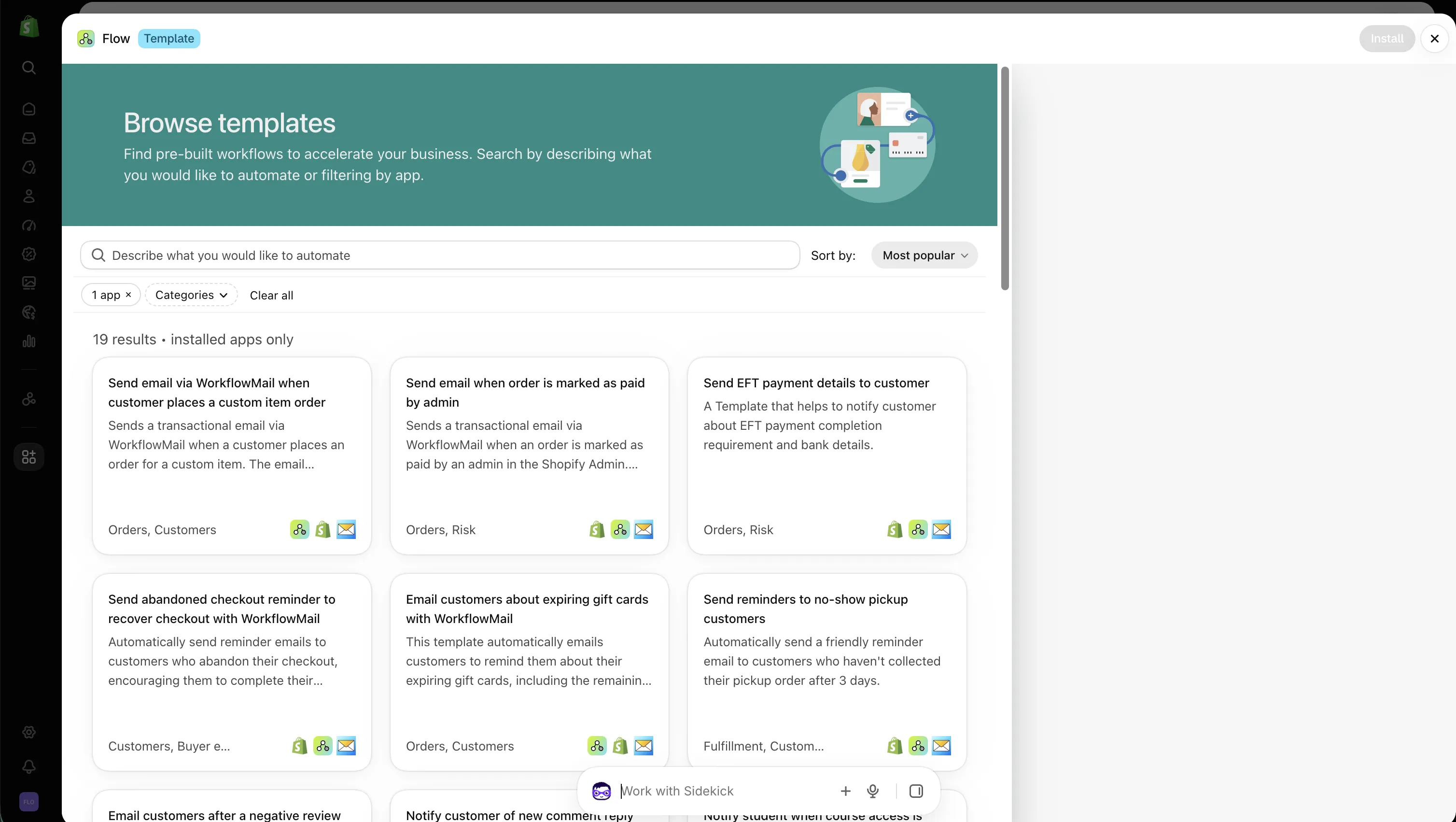
How to use these templates
- Open the WorkflowMail template gallery in your Shopify admin (or use the per-template links below).
- Make sure WorkflowMail is installed on your store – templates that depend on a partner app also need that app installed.
- Click a template, review the trigger, conditions and the email step, adjust the subject line and body to match your brand, then turn the workflow on.
- Test with a real order/customer before relying on it in production.
Each template is a starting point: the email copy, sender address and attachments can all be edited inside WorkflowMail, and you can add extra steps (tags, delays, branches) in Shopify Flow.
All WorkflowMail-powered Shopify Flow templates
Templates are grouped by the app that supplies the trigger or the data. Click any template name to open it directly in the Shopify Flow editor.
Order, checkout & core store emails (Shopify Flow + WorkflowMail) (8)
- Send email via WorkflowMail when customer places a custom item order
Sends a transactional email when a customer orders a custom item. (Shopify Flow, WorkflowMail) - Send email when order is marked as paid by admin
Emails the customer when an admin marks their order as paid. (Shopify Flow, WorkflowMail) - Send EFT payment details to customer
Sends EFT payment requirements and bank details to the customer. (Shopify Flow, WorkflowMail) - Send abandoned checkout reminder to recover checkout with WorkflowMail
Reminds customers to complete an abandoned checkout. (Shopify Flow, WorkflowMail) - Email customers about expiring gift cards with WorkflowMail
Reminds customers about expiring gift cards, including their remaining balance. (Shopify Flow, WorkflowMail) - Send reminders to no-show pickup customers
Reminds customers who haven’t collected their pickup order after three days. (Shopify Flow, WorkflowMail) - Unsubscribe customers who unsubscribe from WorkflowMail
Updates the customer’s Shopify marketing status after they unsubscribe in WorkflowMail. (Shopify Flow, WorkflowMail) - Send pickup point reminder email
Reminds customers who haven’t selected a pickup point within two hours of ordering. (Shopify Flow, WorkflowMail)
Reviews (Yotpo Product Reviews) (1)
- Email customers after a negative review
Sends a transactional email in response to a negative Yotpo review. (Yotpo Product Reviews, Shopify Flow, WorkflowMail)
Comments (Commentify) (1)
- Notify customer of new comment reply
Emails a customer when someone replies to their comment. (Commentify, Shopify Flow, WorkflowMail)
Course & student emails (Courses Plus) (9)
- Notify student when course access is granted
Notifies students when they’re added to a course. (Courses Plus, WorkflowMail) - Send a course start reminder when a course is about to start
Emails students before their course starts. (Courses Plus, WorkflowMail) - Notify student when essay is reviewed
Emails students when their essay has been reviewed. Enterprise plan required, per the card. (Courses Plus, WorkflowMail) - Notify a student when a new drip lesson becomes available
Emails students when a new drip lesson becomes available. (Courses Plus, WorkflowMail) - Send a billing reminder when subscription billing is due in 2 weeks
Reminds students that their subscription billing date is two weeks away. (Courses Plus, WorkflowMail) - Send a billing reminder when subscription billing is due in 3 days
Reminds students that their subscription billing date is three days away. (Courses Plus, WorkflowMail) - Send a halfway reminder when a student completes 50% of a course
Emails students when they complete half a course. Enterprise plan required, per the card. (Courses Plus, WorkflowMail) - Notify a student when their CE credits expire
Emails students when their continuing-education credits expire. Enterprise plan required, per the card. (Courses Plus, WorkflowMail) - Win-back on subscription cancelled
Sends students a discount code when their course subscription is cancelled. (Courses Plus, WorkflowMail)
Community & course emails (Tevello) (3)
- Send an email notification to a member when they are mentioned in a comment or post
Emails members when they’re mentioned in a comment or post. (Tevello, WorkflowMail) - Send an email notification to a member when they have a new unread message
Notifies members about a new unread message. (Tevello, WorkflowMail) - Send an email notification to a member when their quiz is manually reviewed
Notifies members when their quiz has been manually reviewed. (Tevello, WorkflowMail)
Wishlist alerts (Mst: Wishlist Prime) (3)
- Send email alert when a Wishlist product is back in stock using FlowMail
Emails customers when a product on their wishlist is back in stock. (Mst: Wishlist Prime, WorkflowMail) - Send email alert when a Wishlist product is on sale using FlowMail
Emails customers when a product on their wishlist goes on sale. (Mst: Wishlist Prime, WorkflowMail) - Send email alert when a Wishlist product's price drop using FlowMail
Emails customers when a wishlist product becomes available at a lower price. (Mst: Wishlist Prime, WorkflowMail)
Community notifications (Mega Community) (1)
- Send Mega Community notifications to customers using FlowMail
Sends email alerts about engagement with users’ posts or comments, including likes. (Mega Community, WorkflowMail)
Wishlist alerts (Wishlist Guru) (5)
- Removed from wishlist alert triggers when a customer removes a product from their wishlist
Sends an email when a customer removes an item from their wishlist. (Wishlist Guru: Favorites List, WorkflowMail) - Price drop alert triggers when a product or variant price drops, notifying interested customers
Emails interested customers when a product or variant’s price drops. (Wishlist Guru: Favorites List, WorkflowMail) - Low stock alert triggers when a wishlist product or variant reaches a low-stock inventory level
Emails customers when an item saved in their wishlist reaches a low-stock level. (Wishlist Guru: Favorites List, WorkflowMail) - Send reminder email via FlowMail when a customer adds a product to their wishlist
Sends personalized reminder emails about items saved in a customer’s wishlist. (Wishlist Guru: Favorites List, WorkflowMail) - Send back-in-stock email alerts when a wishlist product becomes available again
Emails customers when a product or variant in their wishlist becomes available again. (Wishlist Guru: Favorites List, WorkflowMail)
Invoices (Mega PDF Invoices) (1)
- Send Invoice When Order is Created
Retrieves the PDF invoice URL for a newly created order and sends it to the customer. (Mega PDF Invoices, WorkflowMail)
Preorders & back in stock (Preorder Guru) (4)
- Send an Automated Email when an Item Is Back in Stock
Emails customers when an item they wanted is back in stock. (Preorder Guru – Back in Stock, WorkflowMail) - Send an Automated Email when a Preorder Activity Occurs
Sends preorder emails, including order confirmations and reminders for payments due soon or overdue. (Preorder Guru – Back in Stock, WorkflowMail) - Send an Automated Email when a Partial Payment Is Successfully Completed
Emails the customer when their order payment is successfully completed. (Preorder Guru – Back in Stock, WorkflowMail) - Send an Admin Alert Email when a Preorder Has a Partial or Pending Payment
Alerts the store admin when a preorder has a partial payment or a pending amount due. (Preorder Guru – Back in Stock, WorkflowMail)
Memberships (Zendra Memberships) (2)
- Send discount code when membership is cancelled
Creates and emails a discount code to encourage customers who cancelled their membership to rejoin. (Zendra Memberships, WorkflowMail) - Send discount code when membership trial expires
Creates and emails a discount code when a membership trial ends, encouraging conversion. (Zendra Memberships, WorkflowMail)
Want to see your app here?
We're happy to collaborate! Contact us so we can create a Flow template with your app and list it in our blog.
What these templates cover
Across the 38 templates you'll find automations for almost every transactional touchpoint a store needs:
- Orders & payments – custom item orders, paid-by-admin notices, EFT/bank details, invoices.
- Checkout recovery – abandoned checkout reminders.
- Gift cards – expiry reminders with remaining balance.
- Pickup & fulfillment – no-show pickup reminders, pickup-point selection reminders.
- Reviews & community – negative review follow-ups, comment replies, member mentions, unread messages, quiz reviews.
- Education – course access, start reminders, drip lessons, essay reviews, billing reminders, CE credit expiry, win-back on cancellation.
- Wishlists – back in stock, price drop, on sale, low stock, removed-from-wishlist, reminder emails.
- Preorders – back in stock, preorder activity, partial payment confirmations, admin alerts.
- Memberships – discount codes on cancellation and on trial expiry.
- Unsubscribe handling – keep Shopify marketing status in sync with WorkflowMail unsubscribes.
Need a template that isn't here?
WorkflowMail templates are just Shopify Flow workflows with a Send transactional email action at the end. If you have a trigger from any app (or a native Shopify trigger) that should result in an email, you can build it yourself in a few minutes – or ask us and we'll point you in the right direction.
Browse the full gallery here: WorkflowMail Shopify Flow templates. And if you haven't tried WorkflowMail yet, it's free to install and includes 500 free lifetime Flow actions to try.
Free plan available · 500 free lifetime Flow actions to try
Happy automating! 🚀